 Skip to content

For years, Microsoft Teams VDI optimization has exposed a contradiction in modern virtual desktop infrastructure.
The desktop may live in a data center or cloud. However, the user still sits at a physical endpoint with a camera, microphone, speakers, headset, monitors, and local processing power. As soon as that user joins a Teams meeting, the endpoint becomes a very important part of the experience.
Microsoft is now changing the architecture underneath that experience.
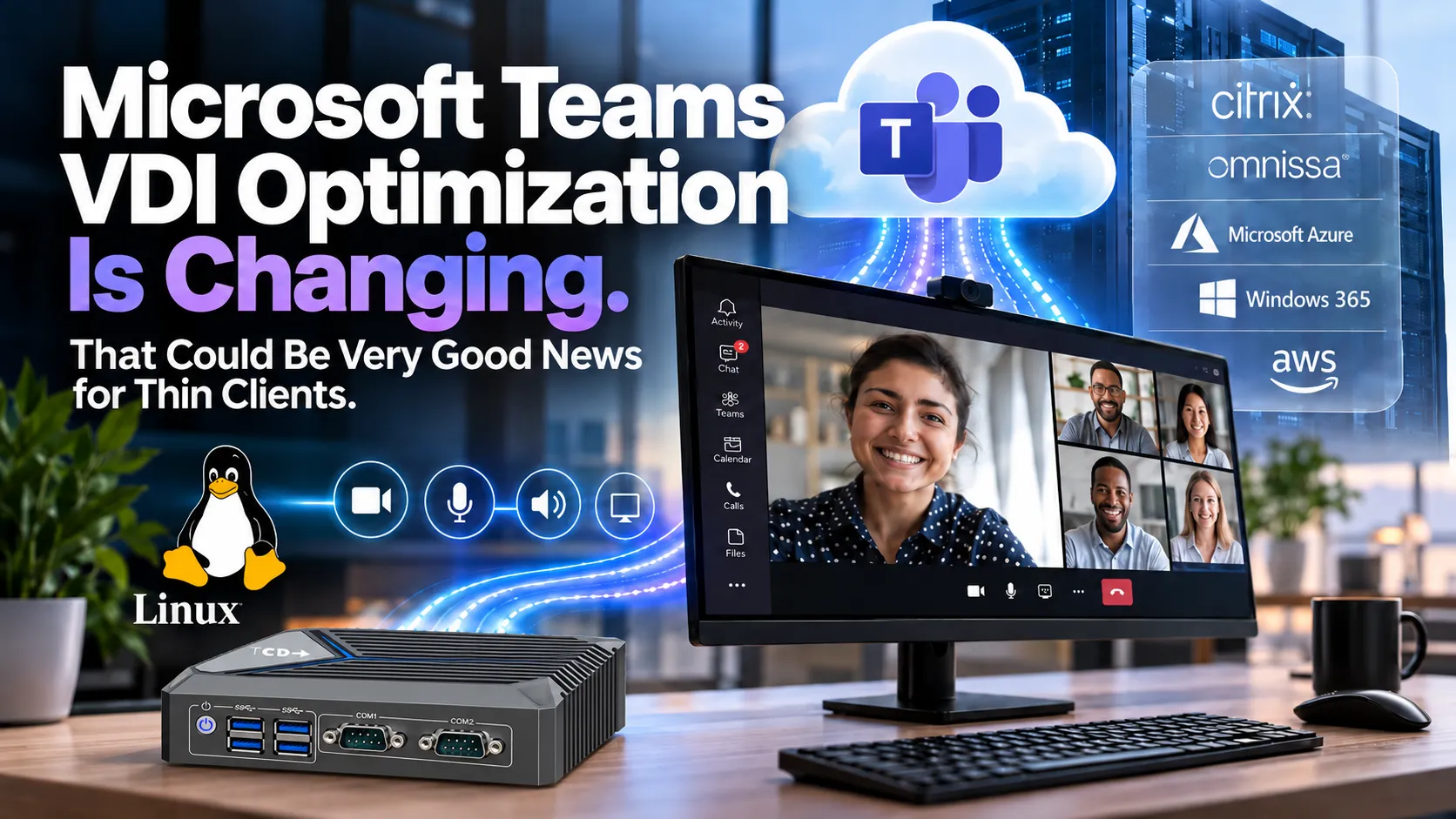
The shift from traditional WebRTC-based VDI optimization to Microsoft’s newer SlimCore architecture could ultimately matter more to the thin-client industry than another Teams upgrade. Microsoft is taking greater ownership of the media stack itself, potentially simplifying how Teams works across Citrix, Omnissa Horizon, Azure Virtual Desktop, Windows 365, Amazon WorkSpaces and other supported EUC environments.
And for Linux-based thin clients in particular, that may turn out to be very good news.
Microsoft Teams VDI optimization is becoming more Microsoft-controlled
To understand why this matters, it helps to look at how Teams traditionally worked in a virtual desktop.
Sending all of a user’s real-time audio and video through the virtual desktop would be enormously inefficient. The virtual machine would need to receive the webcam stream, process it, send it to Microsoft, receive video from everyone else in the meeting, render those streams, and then send the resulting display back down to the endpoint.
Multiply that by hundreds or thousands of users and the infrastructure impact becomes obvious.
The EUC industry solved this by moving much of the real-time media workload back to the physical endpoint. Teams still appears to run inside the virtual desktop, but cameras, microphones, audio,o and video can be processed locally.
That optimization model works extremely well, but it has also created a complicated chain of dependencies between Microsoft Teams, the VDI platform, the VDI client, the endpoint OS, and the media components running locally.
Citrix had its optimization stack. Omnissa Horizon had its implementation. Microsoft’s AVD and Windows 365 environment had another. Each endpoint OS then had to keep up with the appropriate combination of clients, media engines, codecs, peripherals,als and Teams changes.
Microsoft’s newer architecture changes some of those boundaries.
At the center is SlimCore, Microsoft’s own Teams media engine. Microsoft describes SlimCore as an operating-system-specific media engine, not VDI-vendor-specific. It updates automatically with Teams and, in the current Windows implementation, is about 50 MB.
That distinction—OS-specific rather than VDI-vendor-specific—is important.
Instead of Citrix, Omnissa, and Microsoft each needing fundamentally different Teams media engines, the architecture lets Microsoft own the media layer and connect it to each VDI platform through the appropriate plugin and virtual channel.
Citrix, for example, still provides the HDX transport and Workspace App, but Microsoft’s media engine now handles the optimized Teams media instead of Citrix’s traditional HdxRtcEngine. Citrix documents the new model as Microsoft-owned virtual channels connecting Teams inside the VDA with SlimCore on the physical endpoint.
The same principle extends beyond Citrix.
This isn’t really a Citrix story.
It is a Microsoft Teams story that affects the entire VDI ecosystem.
October 1 has passed—but Linux thin clients are not facing the same deadline
Much attention has focused on October 1, 2026.
That date has now passed.
For Windows endpoints connecting to Citrix and Azure Virtual Desktop/Windows 365, Microsoft’s traditional WebRTC-based optimization reached End of Support on October 1, 2026. It can continue to function for now, but Microsoft and Citrix no longer officially support that legacy optimization path in those affected Windows scenarios.
The next major date is April 1, 2027, when WebRTC optimization reaches End of Availability for those Windows endpoints, and Microsoft enforces its new optimization architecture. If optimization cannot be established, media can fall back to being processed inside the virtual desktop itself.
Omnissa’s Windows timetable comes later: Microsoft currently lists July 1, 2027 for End of Support and October 1, 2027 for End of Availability.
But none of those dates mean Linux thin clients suddenly stop optimizing Microsoft Teams.
Microsoft states explicitly that customers using Linux-based thin clients are not affected by those Windows WebRTC retirement dates. Microsoft continues to support existing multimedia optimization on AVD/Windows 365, Citrix, and Omnissa until it releases its new Linux VDI solution.
That distinction is critical. An organization has no reason to see the Windows deadline and conclude it needs to replace a Linux thin-client estate.
If anything, the more interesting story is what happens to Linux next.
Linux could be one of the biggest beneficiaries.
Microsoft has not yet published the final design, release date, supported distributions, or hardware requirements for its new Linux VDI optimization.
So we shouldn’t pretend that a Linux version of SlimCore has already been defined.
But Microsoft’s architecture gives us a strong indication of where things could go.
SlimCore has deliberately been designed around the endpoint operating system rather than the VDI vendor. Microsoft already uses that approach with Windows and has expanded the new architecture to support Mac environments.
If Microsoft carries that same design into Linux, there should be no architectural reason to create a completely different Teams media engine for Citrix Linux, another for Omnissa Linux, and another for every other VDI platform.
The more logical model is a Microsoft-owned Linux media engine with VDI-specific integration around it.
Citrix still needs its integration.
Omnissa still needs its integration.
Microsoft’s own remote desktop platform still needs its integration.
But the underlying Teams media engine could increasingly remain Microsoft technology.
That could reduce one of the more complicated layers of the Linux thin-client ecosystem.
Today, a Linux endpoint OS provider has to track changes coming from the VDI vendor, Microsoft Teams, the local multimedia stack, peripherals, codecs, and hardware drivers. If Microsoft takes greater responsibility for Teams media processing, endpoint vendors can focus more on what they do best: security, hardware compatibility, peripheral support, management, and lifecycle.
For organizations considering that type of Linux endpoint architecture, we have a dedicated overview of thin clients for UniconOS and how purpose-built endpoint hardware can fit into that model.
A common media engine could also make multi-VDI environments easier
This could matter just as much to enterprises that don’t run one VDI platform everywhere.
Many large organizations don’t.
They may have Citrix in one part of the company, Omnissa Horizon somewhere else, AVD for certain workloads, and Windows 365 for another user population.
Historically, those choices could change how Teams was optimized on the endpoint.
Microsoft increasingly owning the media layer could make that experience more consistent.
The endpoint may still use a Citrix plugin when connecting through Citrix and an Omnissa integration when connecting through Horizon. Still, the Teams media processing underneath could ultimately be handled by the same Microsoft technology.
Microsoft already illustrates the new design’s flexibility with a user who moves between a Windows BYOD endpoint using SlimCore and a corporate-managed Linux thin client that currently supports WebRTC. Teams can switch optimization stacks as the user moves between those devices.
For an EUC industry that has spent decades solving interoperability problems between hardware, operating systems, VDI clients and applications, greater standardization at the Teams media layer would be welcome.
Does SlimCore mean more powerful thin clients?
This is probably the next question thin-client buyers should be asking.
SlimCore still does genuine processing at the endpoint.
The physical device has to handle camera video, incoming participant streams, microphones, speakers, screen sharing, and other real-time media functions.
So Microsoft’s change does not make endpoint hardware irrelevant.
But it doesn’t necessarily mean endpoints suddenly need much larger processors either.
In fact, Microsoft’s existing requirements are surprisingly modest.
For its current Windows SlimCore implementation, Microsoft lists a minimum four-core Intel Celeron-equivalent processor at 1.10 GHz and 4 GB of RAM.
That does not suggest every thin client suddenly needs Core i5-class hardware.
The more important change is the endpoint processor type.
SlimCore supports endpoint hardware acceleration. Microsoft lists hardware acceleration as supported under its new optimization architecture, while the older WebRTC stack doesn’t offer the same capability.
That makes modern processor design increasingly important.
Today’s low-power CPUs include dedicated graphics and media engines that encode and decode video far more efficiently than relying on the general-purpose CPU to do everything in software.
So the question isn’t necessarily:
How fast is the CPU?
A better question is:
How modern is the CPU and what multimedia capabilities does it contain?
That distinction matters enormously in thin clients.
A newer low-power processor can be a much better Teams endpoint than an older processor with a similar or even higher headline clock speed.
For endpoint fleets expected to remain in service for four, five, or more years, this makes modern Intel N-series-class processors particularly interesting. CPUs such as the N100, N150, and N200 provide capable integrated graphics and media processing while staying within the cost, power, and thermal envelope expected of thin-client hardware.
Modern matters more than expensive.
And richer Teams features naturally create richer endpoint workloads
Efficiency is only half the story.
Microsoft is not introducing a new optimization architecture to recreate everything WebRTC already does.
SlimCore closes many of the feature gaps that existed under traditional WebRTC optimization.
Microsoft currently lists capabilities such as 1080p video, endpoint hardware acceleration, larger gallery views, Quality of Service, voice isolation, presenter mode, additional background capabilities, and improved administrative visibility under the new architecture.
Those are meaningful improvements.
They also mean user expectations will keep increasing.
An audio-only call is not the same workload as 1080p video with several participant streams, background processing, noise suppression, screen sharing, and multiple high-resolution monitors.
That is why extremely old thin-client processors become increasingly questionable even if the device can still successfully boot and connect to a remote desktop.
There is an important difference between still functional and still appropriate.
A thin client that was perfect for an ICA or RDP session seven years ago may still launch that session today. That does not automatically make it the endpoint we would select for another five years of modern collaboration workloads.
RAM is similar: enough headroom matters more than oversized specifications
Microsoft’s existing minimum of 4 GB again provides useful context.
A purpose-built Linux endpoint typically has much less operating-system overhead than a general-purpose Windows PC. No evidence today suggests Microsoft’s next-generation optimization requires every thin client to carry 16 GB of RAM.
But the local endpoint does more than it once did.
VDI clients, browser processes, authentication components, management agents, peripheral services, and multimedia components may run alongside one another.
For that reason, 8 GB increasingly makes sense as a practical baseline for a new enterprise thin client, even where the basic workload technically runs in less.
Sixteen gigabytes may help heavier use cases or customers buying future headroom. Still, the objective should remain sensible sizing rather than turning every thin client into a desktop workstation.
The same applies to storage.
SlimCore itself is relatively small, but Microsoft increasingly maintains local components, configuration, logs, and media-related data on the endpoint. This means endpoint operating systems need a clean way to provide controlled writable space even when the overall OS is designed to remain locked down.
That isn’t fundamentally incompatible with a secure or read-only Linux architecture.
It simply means modern thin-client operating systems may need a tightly controlled writable area for selected cloud-workspace components while keeping the rest of the endpoint protected.
Software lifecycle may matter as much as hardware lifecycle. Another consequence of Microsoft taking greater ownership of the media stack: software currency becomes even more important.
Microsoft’s current implementation automatically updates SlimCore based on the Teams version in the virtual desktop. The plugin can download the appropriate media-engine version without requiring the administrator to manually package the media engine each time Teams changes.
That is a good thing.
But it reinforces a broader trend in thin clients.
The useful life of endpoint hardware can no longer be measured only by asking whether the CPU still works or whether the device still boots.
A physically healthy endpoint can become operationally obsolete if its OS no longer receives current Citrix Workspace App versions, Horizon Client updates, Microsoft integration changes, browser updates, peripheral fixes, or security patches.
That is why the thin client software support lifecycle increasingly deserves as much attention as the hardware specification itself.
In the modern EUC world, a device’s real lifecycle ends when the surrounding software ecosystem can no longer keep pace—not simply when the hardware fails.
This changes the competitive question for Linux endpoint vendors
If Microsoft eventually brings the same SlimCore philosophy to Linux, endpoint OS vendors may find themselves competing on a somewhat different basis.
The question becomes less:
Who built the Teams media optimization?
And more:
How well does the platform support Microsoft’s media optimization?
Does the OS expose hardware video acceleration correctly?
Does it support modern webcams and headsets?
Does it handle HID peripherals properly?
Can Microsoft components update without weakening the security model?
Can the platform maintain the necessary local state without turning a locked-down endpoint into a general-purpose PC?
How quickly can the vendor certify and deploy new Citrix, Omnissa, and Microsoft components?
And can IT manage all of that consistently across hundreds or thousands of devices?
Those are healthy questions for the thin-client industry because they move competition back toward whattoward what endpoint platforms should be differentiated on: reliability, security, manageability, hardware support, and lifecycle.
The bigger change is what a thin client actually is
Perhaps the most interesting outcome of all this has very little to do with October 1.
For years, people described thin clients primarily by what they didn’t do.
They didn’t run much locally.
They didn’t store much data.
They didn’t need much processing capability.
They connected users to a desktop or application running elsewhere.
That description is becoming outdated.
Today’s endpoint increasingly handles cameras, microphones, video decoding, graphics acceleration, browsers, authentication, USB peripherals, and parts of the collaboration workload locally.
The desktop may be remote, but important parts of the user experience happen at the edge.
That doesn’t weaken the thin-client model.
It modernizes it.
The thin client is increasingly becoming a secure, purpose-built edge device for the cloud workspace.
The objective remains to keep the endpoint simpler than a general-purpose PC, minimize the attack surface, and simplify management.
But “thin” should no longer be confused with “underpowered.”
The right endpoint is the one that puts enough modern processing at the edge to handle the pieces of the workload that belong there—without turning the device back into an unmanaged traditional PC.
What Microsoft Teams VDI optimization means for endpoint strategy
Organizations shouldn’t react to Microsoft’s Teams transition by automatically replacing their existing thin clients.
That is particularly true for Linux fleets, which Microsoft explicitly says remain supported on the existing optimization architecture until the new Linux VDI solution arrives.
But organizations shouldn’t assume any device that can open a Citrix, Horizon, or AVD session today is the right endpoint for the next five years.
The sensible answer sits between those extremes.
Look at the hardware you already own. Focus on one CPU generation rather than just clock speed.
Evaluate hardware multimedia capability.
Make sure there is sensible RAM and storage headroom.
Look closely at the endpoint OS vendor’s update cadence and support lifecycle.
And test real workloads.
Use the webcam your users actually have.
Use the headset they actually plug in.
Drive the number and resolution of monitors they actually use.
Join a real Teams meeting, share a screen, and see what happens.
That tells you far more about endpoint suitability than simply checking whether a processor exceeds a minimum specification.
At ThinClient Direct, that is how we increasingly think endpoint strategy should work.
The decision doesn’t begin with Linux versus Windows, Citrix versus Omnissa, or new versus repurposed hardware.
It begins with the workload.
From there, the goal is to determine which combination of endpoint hardware, endpoint operating system, and virtual workspace platform gives the organization the right balance of user experience, security, manageability, and lifecycle cost.
This looks like good news for EUC
There are still important unknowns.
Microsoft has not yet published the final architecture or hardware requirements for its new Linux VDI solution.
Until it does, we shouldn’t assume that every implementation detail from Windows and Mac will carry across unchanged.
But the overall direction is encouraging.
Microsoft is taking greater ownership of Teams media processing.
Its new media engine is designed around the endpoint operating system rather than an individual VDI vendor.
Modern hardware acceleration can make low-power processors more capable rather than simply forcing enterprises to buy larger CPUs.
Linux thin clients remain supported today, and Microsoft has explicitly stated it will continue to support the existing optimization until it delivers its next-generation VDI solution for Linux.
If Microsoft carries the same architectural philosophy into Linux, the result could be a simpler, more consistent Teams experience across Citrix, Omnissa, Microsoft and other supported workspace environments.
The cloud desktop isn’t making the endpoint disappear.
It is making us rethink what the endpoint should be.
And for the thin-client world, that may be very good news.
Official technical references
Microsoft’s current architecture and feature information is available in its New VDI solution for Teams documentation and Teams VDI requirements and deployment guidance.
For Citrix environments, see Citrix’s New VDI solution for Teams documentation.
For Horizon environments, see Omnissa’s Microsoft Teams Media Optimization documentation.