 Skip to content

An industrial thin client is a durable, purpose-built endpoint that connects users and equipment to centrally hosted applications, virtual desktops, cloud workspaces, and browser-based systems. It is designed for manufacturing, logistics, healthcare, utilities, kiosks, and other environments where a conventional office PC may not be the right fit.
For organizations that primarily run workloads in Citrix, Omnissa Horizon, Azure Virtual Desktop, Windows 365, RDP, or web applications, an industrial thin client can provide the required reliability and connectivity without the high price of an overconfigured industrial PC.
The challenge is knowing how much industrial hardware you actually need.
Some industrial computers are engineered for extreme temperatures, intensive edge processing, machine vision, automation control, specialized certifications, or advanced expansion. Those capabilities can be essential—but they can also add high cost when the endpoint’s primary role is to provide secure access to centralized applications.
ThinClient Direct takes a more practical approach: deliver the industrial features the deployment actually requires, combine them with strong endpoint support, and avoid charging customers for unnecessary local computing power.
Industrial Thin Clients at a Glance
Industrial thin clients are particularly well suited to environments that need:
- Fanless operation and a durable metal enclosure
- Secure access to centralized applications and desktops
- Centralized configuration, updates, and support
- Legacy connectivity such as serial or COM ports
- Multiple network connections or network segmentation
- Reliable operation across extended shifts
- Flexible mounting and compact installation
- Lower endpoint costs than heavily configured industrial PCs
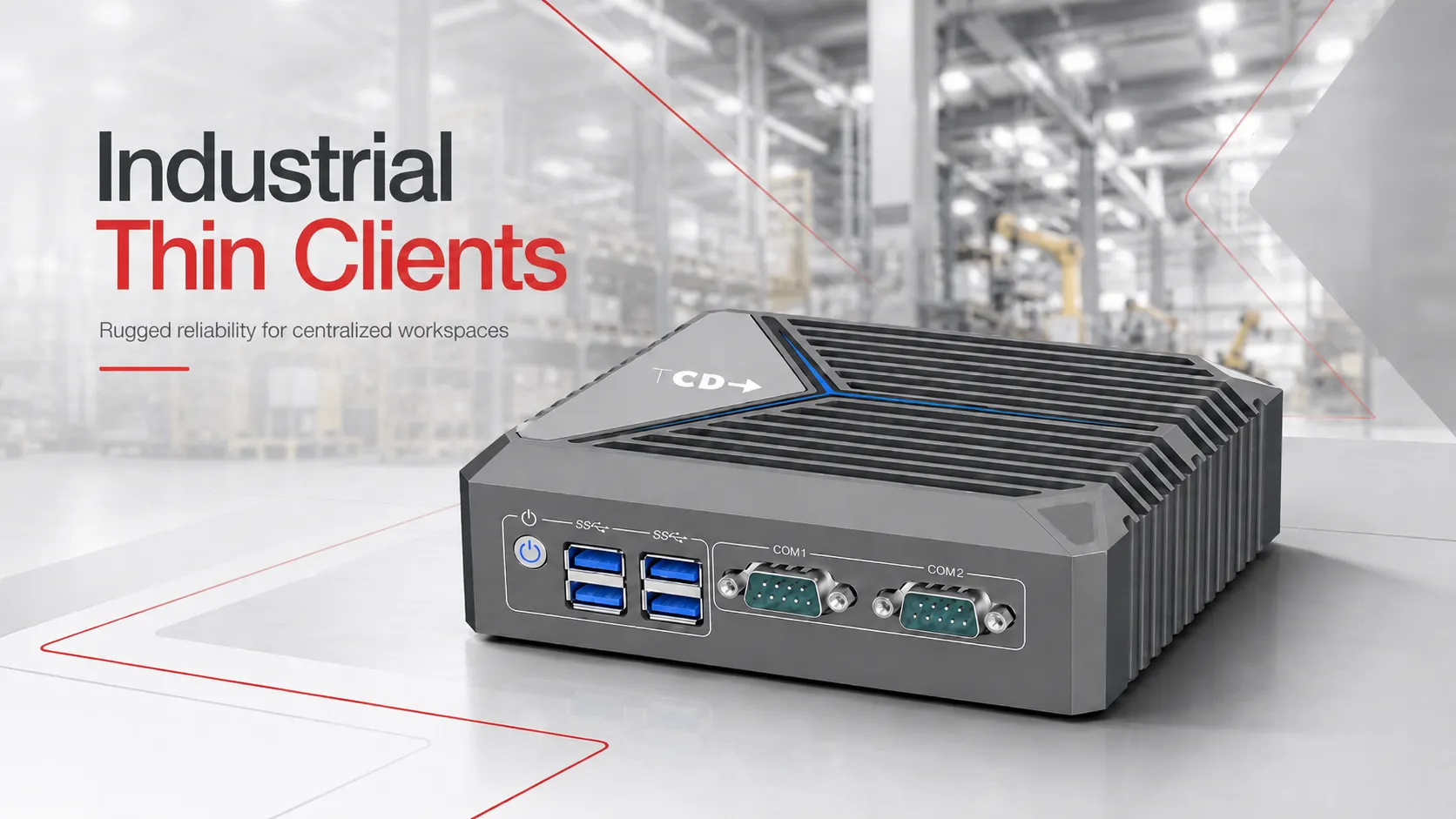
The TCD i Series combines a fanless aluminum chassis with dual Gigabit LAN, dual COM ports, eight USB ports, dual 4K display support, flexible storage and wireless expansion, and support for leading thin client operating systems.
What Is an Industrial Thin Client?
An industrial thin client is an endpoint designed for demanding or non-office environments. Instead of running every business application locally, it connects to applications and desktops hosted in a data center, private cloud, public cloud, or other centralized infrastructure.
The endpoint is responsible for connectivity, authentication, peripheral support, session display, and user input. Most of the application processing and data storage remain centralized.
This model can help IT teams:
- Reduce local endpoint complexity
- Standardize configurations across many locations
- Limit the amount of data stored on individual devices
- Apply updates and policies centrally
- Replace failed endpoints more quickly
- Extend endpoint lifecycle
- Support shared or task-based workstations
Industrial thin clients are one category within a broader thin client hardware strategy. What makes them different is their emphasis on enclosure durability, passive cooling, industrial connectivity, flexible mounting, and operation outside a conventional office setting.
Where Are Industrial Thin Clients Used?
Industrial thin clients are used wherever organizations need dependable access to centralized systems without installing a traditional desktop PC at every workstation.
Manufacturing and Production Floors
Operators can use industrial thin clients to access manufacturing execution systems, ERP platforms, production instructions, quality-control applications, dashboards, and virtual desktops.
A compact fanless endpoint can be installed at a fixed workstation, production station, equipment cabinet, or operator console while applications and data remain centralized.
Warehouses and Logistics Centers
Warehouse employees may need access to inventory platforms, transportation management systems, order-processing applications, scanners, and logistics dashboards.
Industrial thin clients are useful in these locations because they can support compact installations, continuous use, peripheral connectivity, and centralized management across distributed facilities.
Control Rooms and Monitoring Stations
Control rooms often require reliable access to dashboards, monitoring applications, alarms, reporting tools, and virtual desktops. Multi-display capability can be particularly important in these environments.
An industrial thin client can provide the display and network connectivity required without turning every monitoring station into a full local workstation.
Healthcare and Clinical Operations
Shared clinical workstations, carts, labs, pharmacies, check-in stations, and back-office healthcare environments can benefit from secure, centrally managed endpoints.
The suitability of any device should still be evaluated against the facility’s cleaning, electrical, mounting, and regulatory requirements.
Kiosks and Dedicated Task Stations
Industrial thin clients can support self-service kiosks, employee check-in stations, digital forms, timekeeping systems, training stations, and dedicated browser-based applications.
They are particularly effective when the endpoint has a clearly defined purpose and does not require substantial local processing.
These deployments represent some of the broader thin client use cases where centralized computing can improve control, consistency, and endpoint manageability.
Which Industrial Endpoint Is Right for Your Workload?
An industrial thin client and an industrial PC may look similar, but they are designed for different types of workloads.
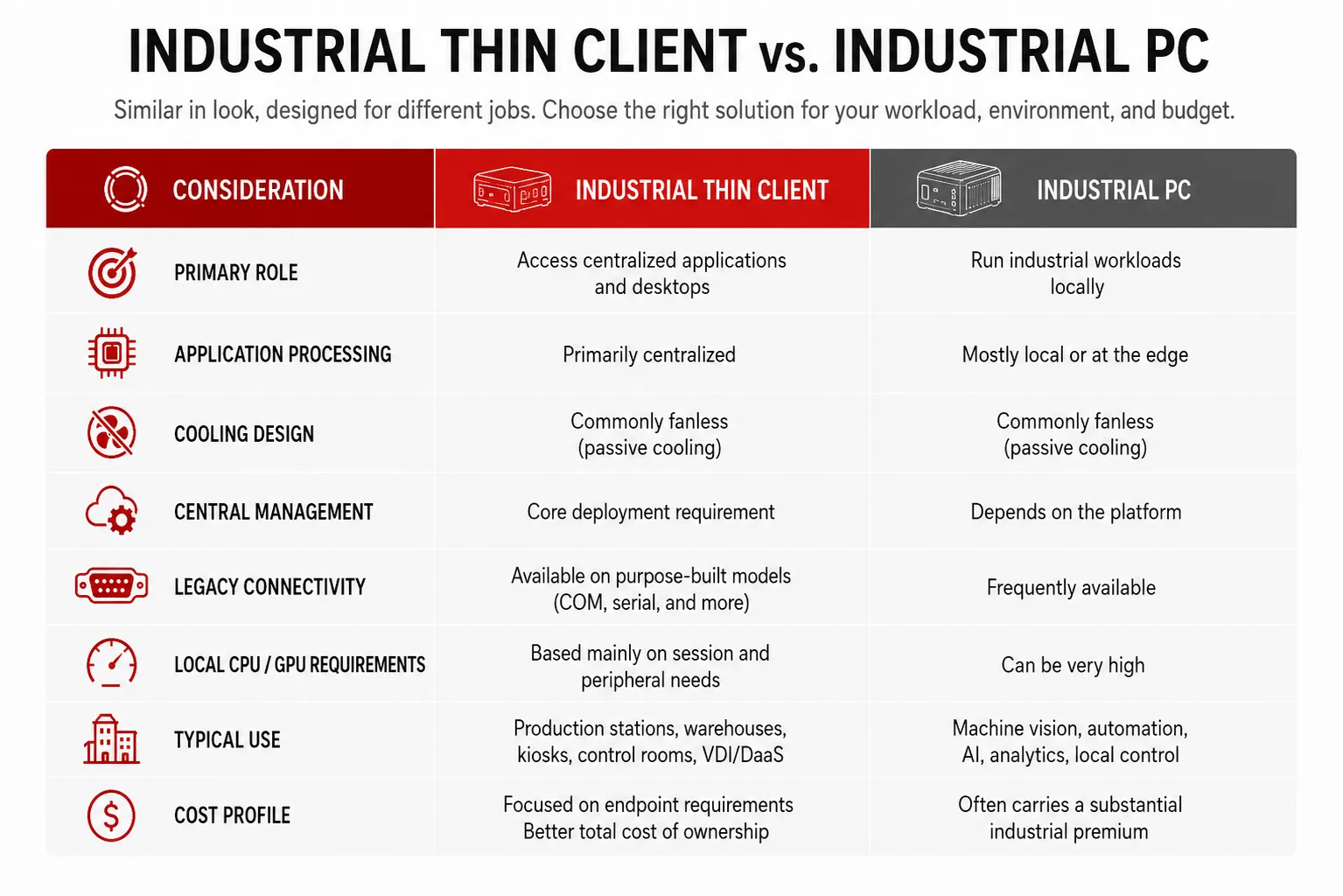
The decision should begin with the workload.
When the device must perform machine control, intensive analytics, machine vision, AI inference, or other compute-heavy work locally, a full industrial PC may be necessary.
When the device primarily connects a user to a virtual desktop, remote application, browser-based system, or centralized dashboard, an industrial thin client may provide a better balance of durability, manageability, security, and cost.
Why Do Industrial Computers Carry Such a High Premium?
The premium attached to industrial computing is not always arbitrary. Some devices require expensive engineering, specialized components, certifications, wide operating-temperature ranges, advanced expansion, shock and vibration testing, ingress protection, or long-term component availability.
The problem arises when every industrial deployment is treated as though it requires all of those capabilities.
A workstation used to access a hosted ERP application on a production floor does not necessarily require the same local processing power as a computer performing real-time machine vision. A warehouse dashboard does not necessarily need a high-end GPU. A VDI endpoint does not always need the same expansion architecture as an automation controller.
Paying for unused capabilities can significantly increase the cost of a deployment without improving the user experience.
TCD helps customers identify what the endpoint must actually do before recommending hardware. This reduces the risk of buying an underspecified device and prevents organizations from paying for unnecessary processing power, expansion, or specialized functionality.
Why Fanless Design Matters
A fan-based computer pulls air through the enclosure to cool its internal components. In dusty or particle-heavy environments, that airflow can also draw contaminants into the device.
A fanless thin client uses passive cooling instead. The chassis helps dissipate heat without relying on a mechanical cooling fan.
This provides several potential advantages:
- Fewer moving components
- Reduced dust intake
- Lower operating noise
- Less fan-related maintenance
- Better suitability for enclosed or compact installations
- More predictable operation across extended shifts
The TCD i Series uses an all-aluminum fanless chassis designed to dissipate heat while reducing common fan-related failure points. Its supported operating range reaches from -20°C to 50°C when configured with an industrial SSD.
Fanless design alone, however, does not make every device suitable for every industrial environment. Temperature range, airflow, enclosure placement, workload, storage type, and mounting position must still be considered.
Industrial Connectivity Without Extra Adapters
Industrial and legacy environments may require connections that are no longer common on standard office computers.
The TCD i Series includes:
- Two Gigabit Ethernet ports
- Two configurable RS232/RS485 COM ports
- Four USB 3.2 ports
- Four USB 2.0 ports
- Two HDMI display outputs
- Optional Wi-Fi and Bluetooth
- Optional 4G connectivity
- Multiple storage and expansion options
Dual COM ports can support direct connectivity with compatible PLCs, scanners, control equipment, and other serial devices. Dual LAN interfaces can support network separation, redundancy, or other structured network designs.
Peripheral and protocol compatibility should always be validated during a proof of concept. The presence of the correct physical port does not automatically guarantee that every application, driver, peripheral, or serial protocol will function with every operating system.
Built for VDI and Secure Cloud Workspace Access
Industrial thin clients are not simply rugged mini PCs. Their main value comes from combining fit-for-purpose hardware with a secure, manageable endpoint platform.
TCD industrial thin clients can support environments based on:
- Citrix Virtual Apps and Desktops
- Omnissa Horizon
- Microsoft Azure Virtual Desktop
- Windows 365 Cloud PC
- Microsoft RDP
- Browser-based enterprise applications
- Other compatible VDI, DaaS, and cloud workspace platforms
The hardware can be paired with a suitable thin client software platform based on the organization’s security, application, peripheral, and management requirements.
Customers can select from Rangee, IGEL, Unicon eLux, Praim, Windows 11, Windows 11 IoT, and other compatible operating-system options. A purpose-built thin client operating system can reduce unnecessary local services and provide a more controlled interface for accessing centralized resources.
A thin client does not make an industrial or operational-technology environment secure by itself. It must be part of a properly designed architecture that considers identity, authentication, authorization, network controls, application control, monitoring, and risk management.
The NIST guidance for protecting industrial control system integrity emphasizes risk assessment and security capabilities such as application allowlisting, integrity checking, change control, authentication, and authorization in manufacturing environments.
Centralized Management for Distributed Industrial Sites
Industrial endpoints are often installed in locations where local IT assistance is limited. Sending a technician to every warehouse, production site, branch, or field location can quickly become expensive.
Through centralized endpoint management, IT teams can administer compatible thin clients from a central console.
Depending on the selected operating system and management platform, this can include:
- Device configuration
- Group-based policies
- Software and firmware updates
- Connection profiles
- User-interface restrictions
- Remote troubleshooting
- Device inventory
- Monitoring and reporting
- Zero-touch or simplified deployment workflows
Central management is particularly valuable for standardized task stations. When every endpoint performs a defined function, IT can apply consistent settings across entire groups instead of configuring every device individually.
Lower Cost Does Not Have to Mean Lower Quality
A lower-priced industrial thin client should not be confused with a low-quality commodity mini PC.
The objective is not to select the least expensive box available. It is to choose hardware with the correct thermal design, connectivity, storage, memory, operating system, management platform, warranty, and support model for the intended workload.
TCD focuses specifically on thin client endpoints and cloud workspace access. Customers receive help evaluating:
- VDI and application compatibility
- Display requirements
- USB and serial peripherals
- Network connectivity
- Operating-system selection
- Central management
- Memory and storage
- Mounting requirements
- Deployment configuration
- Pilot and rollout planning
For organizations comparing endpoint economics, the thin client versus PC cost guide explains how purchase price, management, energy use, support, licensing, and lifecycle can affect total cost.
The real savings come from avoiding both extremes: an underqualified endpoint that causes operational problems and an overqualified industrial PC filled with capabilities that the deployment never uses.
What Should You Check Before Choosing an Industrial Thin Client?
Before selecting a device, answer these questions:
1. Will the workload run locally or centrally?
Determine whether the endpoint accesses only hosted applications or must run machine control, analytics, video processing, or other intensive workloads locally.
2. What environmental conditions must it tolerate?
Document the expected operating temperature, dust exposure, vibration, humidity, electrical conditions, airflow, and installation location.
3. Are specific certifications required?
Industrial does not automatically mean IP-rated, intrinsically safe, medically certified, or approved for every regulated environment. Confirm all mandatory certifications before purchasing.
4. Which ports and peripherals are required?
Identify display outputs, serial devices, scanners, printers, touchscreens, smart-card readers, audio devices, and specialized USB peripherals.
5. How will the endpoints be managed?
Choose the operating system and management platform before finalizing the hardware. Confirm update procedures, policy control, remote support, and lifecycle expectations.
6. Can the device be tested in the real environment?
A proof of concept should use the actual applications, peripherals, displays, network, authentication workflow, and management platform.
Testing is particularly important for industrial deployments because two environments that appear similar on paper may have very different peripheral, thermal, or application requirements.
So, Why Choose TCD for Industrial Thin Clients?
ThinClient Direct provides more than industrial hardware. TCD helps organizations build a complete endpoint approach around the environment in which the device will operate.
Customers benefit from:
- Purpose-built industrial thin client hardware
- Competitive pricing without unnecessary configuration premiums
- Fanless metal designs
- Legacy and modern connectivity
- OS-agnostic deployment options
- Support for leading VDI and cloud workspace platforms
- Centralized management options
- Project-specific configuration
- Peripheral and compatibility guidance
- Responsive thin client expertise
- Trial devices for real-world testing
This gives organizations a practical alternative to choosing between an expensive industrial computing platform and an unsupported consumer mini PC.