Azure Virtual Desktop Goes Hybrid: What IT Leaders Need to Know — and How to Optimize Endpoints for the New AVD Era
December 5, 2025
AVD Just Changed — Are Your Endpoints Ready for a Hybrid Future?
Azure Virtual Desktop (AVD) is entering a new era — Azure Virtual Desktop hybrid deployments now allow organizations to run session hosts on-premises using existing servers, while still leveraging Azure’s cloud control plane. This shift fundamentally changes how enterprises design their VDI and endpoint strategy.
For global IT leaders — CTOs, system architects, EUC managers — the mission is now:
How do you secure, optimize, and future-proof endpoints in a hybrid AVD deployment where workloads may shift between cloud and datacenter?
This article synthesizes Microsoft’s announcement, industry analysis, and enterprise implications, then connects them to the critical role of endpoint hardware in hybrid AVD architectures.
Azure Virtual Desktop Becomes Truly Hybrid: What's New
1. AVD Session Hosts Can Now Run On-Premises Using Existing Hardware
Microsoft’s 2025 update allows organizations to run AVD session hosts directly in their datacenters using Azure Arc. This enables Azure Virtual Desktop hybrid deployments on:
- Hyper-V
- VMware / Omnissa vSphere
- Nutanix AHV
- Physical Windows Servers
The official Microsoft documentation — Microsoft’s official guide to AVD hybrid identities — confirms that AVD is no longer a cloud-limited service but a flexible hybrid platform.
This means identity, policy, and management can remain centralized in Azure while workloads stay local for compliance or performance needs.
2. Why Microsoft Expanded AVD Into Hybrid Mode
Across analyst posts, MVP reactions, and partner commentary, the drivers are consistent:
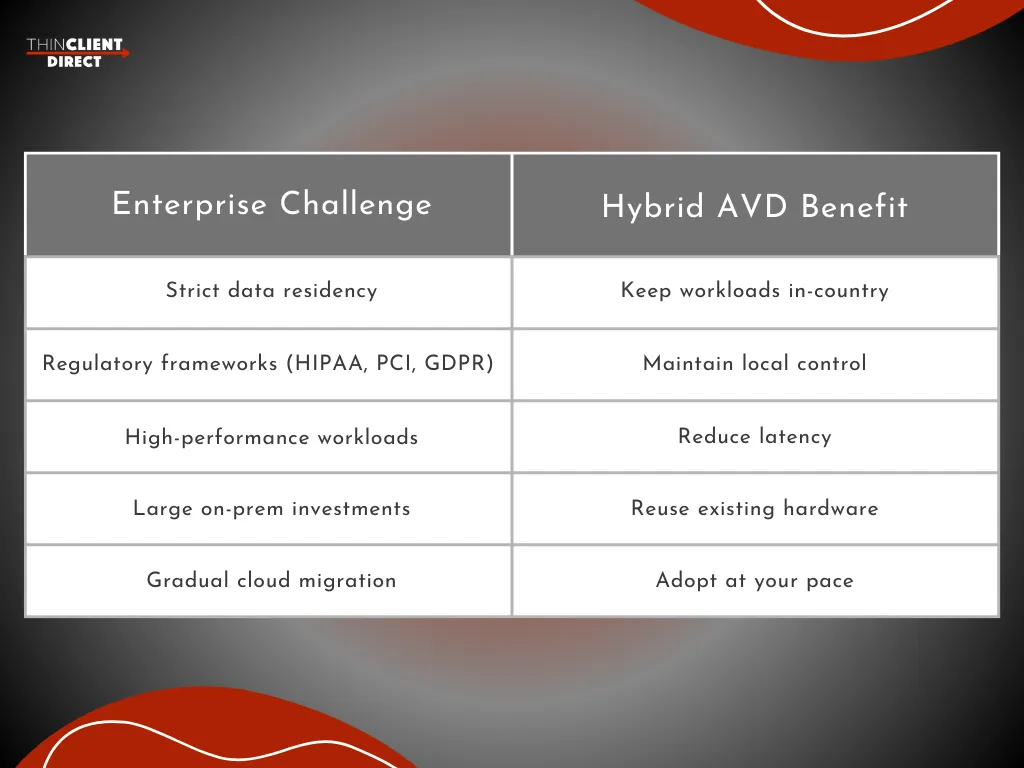
This model primarily benefits healthcare, finance, the public sector, and international organizations managing data sovereignty requirements.
3. AVD's Partner Ecosystem Validates Enterprise Readiness
Key partners were enabled on day one:
- LoginVSI (testing + Hydra optimization)
- Nerdio (automation for hybrid AVD)
- ControlUp (monitoring & EUX analytics)
- Nutanix (native AHV integration)
Their involvement signals that Azure Virtual Desktop hybrid deployments are intended for real-world, large-scale EUC workloads — not a niche use case.
What Hybrid AVD Means for Enterprise EUC Strategy
1. Endpoint Requirements Become More Strategic — Not Less
In a hybrid AVD deployment, endpoints interact with workloads that may run:
- In Azure
- On-premises
- At an edge location
This increases the importance of:
- Optimized RDP Shortpath performance
- Strong security baselines
- Consistent EUX across varied network conditions
- Easy manageability through Entra ID & Intune
Thin clients naturally excel here because they introduce low variance, minimal attack surface, and optimized protocol performance.
For readers comparing endpoint categories, this connects directly to TCD’s in-depth US 2025-26 TCO guide: PCs vs Thin Clients: Cost, Energy Savings & Lifespan Compared.
2. Hybrid AVD Sharply Changes the Total Cost of Ownership Equation
Hybrid AVD enables:
- Extending existing server hardware
- Reducing Azure compute cost via selective hosting
- Adopting the cloud at a more controlled pace
Because infrastructure becomes more flexible, endpoint stability becomes more valuable.
Thin clients provide:
- Lower energy consumption
- Fewer support incidents
- Longer lifecycle than PCs
- Faster provisioning at scale
These are direct TCO levers — and they matter even more in Azure Virtual Desktop hybrid architectures.
3. Compliance & Security Strengthen With the Right Endpoints
Hybrid AVD allows:
- On-prem workloads for protected data
- Local enforcement of internal security controls
- Reduced exposure to the public internet
Thin clients reinforce this by:
- Storing zero local data
- Operating with read-only OS images
- Maintaining strict lockdown policies
When AVD becomes hybrid, your endpoints must be predictable and secure.
4. Unified Management Requires Endpoint Standardization
Azure Arc + AVD delivers a unified identity and management plane. But to fully benefit, endpoints must be:
- Compatible with Entra ID / Intune
- Consistent in performance
- Easy to deploy globally
- Designed for VDI workloads
Hybrid AVD simplifies the control plane — optimized thin clients simplify the edge.
For teams evaluating Microsoft’s desktop portfolio holistically, see: Windows 365 vs Azure Virtual Desktop (AVD): A 2025 Perspective for IT Leaders.
How ThinClient Direct Supports the Hybrid AVD Era
ThinClient Direct specializes in hardware purpose-built for Azure Virtual Desktop hybrid, cloud, and on-prem VDI environments. Here is how TCD delivers unique value:
1. Full Virtualization Compatibility
- AVD (cloud + hybrid)
- Windows 365
- Citrix
- Omnissa Horizon
- RDP server workloads
2. Optimized Performance
- RDP Shortpath acceleration
- Teams & Zoom optimization
- Multi-monitor support
- Smooth peripheral redirection
3. Enterprise-grade Security
- Zero local data
- Locked-down OS
- Remote wipe and control
- Minimal attack surface
4. Lower Long-term Operational Cost
ThinClient Direct helps organizations deploy endpoints that reduce OPEX, improve energy efficiency, and deliver predictable multi-year lifecycle value.
Key Takeaways
- Azure Virtual Desktop hybrid deployment is now enterprise-ready.
- It solves compliance, performance, and migration challenges.
- Hybrid AVD amplifies the importance of endpoint consistency and optimization.
- ThinClient Direct provides the purpose-built thin clients required for secure, scalable hybrid VDI deployments worldwide.
Conclusion: Hybrid AVD Is Here — Align Your Endpoint Strategy
Microsoft’s hybrid AVD model opens the door to unprecedented flexibility — but the real results depend on having the right endpoint strategy in place. Performance, security, and manageability all start at the device layer.
Suppose you’re evaluating hybrid AVD, planning an endpoint refresh, or exploring VDI modernization. In that case, a short strategy session with ThinClient Direct can help you benchmark the right thin-client approach for your environment.
Schedule your consultation with TCD and get personalized endpoint recommendations tailored to your AVD roadmap.
With an optimized endpoint foundation, hybrid AVD becomes faster to deploy, easier to secure, and far more cost-efficient at a global scale.