Desktop as a Service Cost Explained: DaaS vs PCs in 2026
January 27, 2026
For most organizations, endpoint strategy used to be boring in a good way.
Buy business PCs. Refresh every few years. Repeat.
That model starts to break down when the bill of materials becomes unpredictable and more expensive. Over the last few refresh cycles, IT budgets have been squeezed by the same pressures appearing again and again: DRAM pricing volatility, rising SSD costs, and supply-side disruption amplified by AI-driven hardware demand.
As a result, more teams are asking a question that once felt optional:
Should we keep buying full compute for every user, or should we pool resources and deliver desktops as a service?
In buyer language, this is not “shared desktops.”
It is Desktop as a Service (DaaS), closely tied to VDI total cost of ownership and modern endpoint strategy.

Table of Contents
ToggleWhat Is Desktop as a Service (DaaS)?
Desktop as a Service (DaaS) is a cloud-based desktop model where user desktops run centrally and are delivered over the network on a subscription or consumption basis. Instead of purchasing and maintaining full PCs for every employee, organizations pool compute, storage, and security while users access desktops from lightweight endpoints such as thin clients or existing devices.
The Real Cost Problem With 1:1 PCs: You Pay for Idle Capacity
Most knowledge workers do not “use a PC.” They use:
- a browser
- Teams or Zoom
- a few line-of-business apps
- a security stack that keeps expanding
Yet every user still receives a fully provisioned device sized for peak usage that may occur only a few hours per week.
The traditional model looks like this:
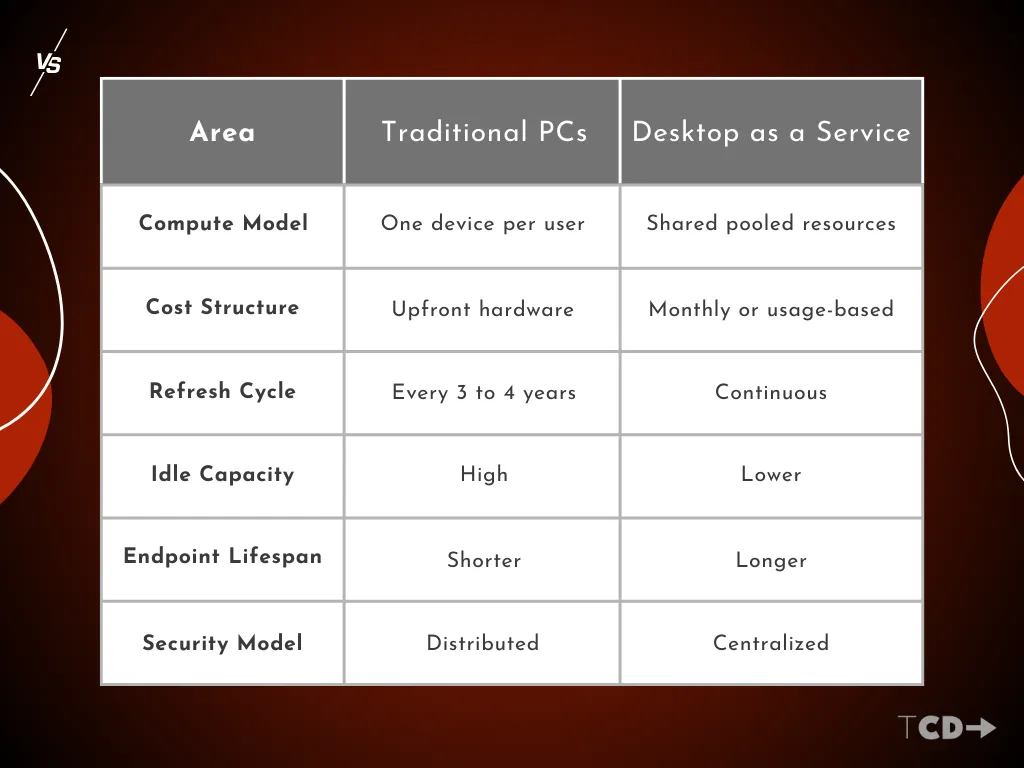
- CPU and RAM purchased per user
- Refresh cycles driven by age, not utilization
- Significant idle capacity across the fleet
Pooling compute changes the economics from duplication to utilization.
Desktop as a Service vs Traditional PCs
What Counts as DaaS, VDI, and RDS
Understanding cost requires precision.
- Desktop as a Service (DaaS)
Cloud-hosted desktops delivered as a service. Infrastructure and control plane are provider-managed. - VDI
Centralized desktops operated by the customer on premises or private cloud. Often flexible but operationally heavier. - RDS and session-based desktops
Best suited for task workers and shared environments where maximum density per host is the priority.
All three rely on pooled resources. The difference is where costs appear and who manages complexity.
Why This Is Timely Now
Endpoint economics are under pressure.
If DRAM and storage prices increase, PC refresh cycles become harder to justify. Concentrating upgrades inside pooled infrastructure often becomes more financially predictable than upgrading hundreds or thousands of endpoints. For deeper context on this shift, see the DRAM cost surge impacting endpoint strategy.
The outcome is rarely all cloud or all physical. Most organizations land on segmentation.
Typical Desktop as a Service Cost Range
Organizations searching for Desktop as a Service cost usually want a number. The reality is a range.
For most environments:
- $30 to $45 per user per month for entry-level knowledge worker desktops
- $50 to $100 per user per month for mid-tier configurations
- $150 to $200+ per user per month for high-performance or GPU-enabled desktops
Actual cost varies based on CPU, memory, storage, uptime model, licensing posture, and commitment length.
Desktop as a Service Cost: What Drives the Number
The biggest cost variables consistently include:
- Compute and memory
vCPU and RAM sizing have the largest impact on spend. - Storage and user profiles
Persistent storage and profile management are frequently underestimated. - Usage model
Always-on desktops cost significantly more than stop-start models for part-time users. - Licensing
Existing Microsoft licensing can materially change economics in platforms like Azure Virtual Desktop. - Management and support
Some providers bundle management while others require internal resources.
For authoritative guidance on how these costs are calculated, Microsoft outlines the fundamentals clearly in how Azure Virtual Desktop costs are calculated.
Is Desktop as a Service Cheaper Than Buying PCs?
Desktop as a Service can be cheaper when users have standardized workloads, shared usage patterns, or part-time activity. It can be more expensive when desktops are oversized, always on, or licensed inefficiently. The determining factor is utilization, not headcount.
Why Does Desktop as a Service Pricing Vary So Much?
Pricing varies because providers charge differently for compute size, storage type, uptime model, licensing, and management scope. Two organizations with the same user count can see very different monthly costs depending on how resources are allocated.
When Does VDI or DaaS Make Financial Sense?
DaaS and VDI typically make financial sense when workloads can be standardized, compute can be shared, endpoint refresh cycles can be extended, and support overhead can be reduced.
When Is DaaS More Expensive Than Physical Desktops?
DaaS becomes expensive when every user receives a high-performance dedicated VM, GPU usage is constant, or desktops remain powered on without utilization controls.
Where Pooled Desktops Usually Win on TCO
Virtual desktops often show strong economics in environments with:
- standardized application stacks
- shift work or shared seating
- remote and hybrid users
- high support costs tied to distributed PCs
This is also where thin clients become logical. When the desktop runs centrally, the endpoint’s role shifts from performance to reliability and longevity.
The Ultimate Thin Client Guide for 2026 offers a deeper breakdown.
The Honest Counterpoint
Centralizing desktops is easy to describe and expensive to implement poorly. Common pitfalls include:
- licensing sprawl
- storage inefficiencies
- GPU creep affecting all users
- overprovisioned cloud desktops
- deploying virtualization universally instead of selectively
DaaS is not automatically cheaper. It becomes financially effective only when pooled capacity is right-sized and user cohorts are intentionally selected.
Bottom Line
Rising PC and component costs are forcing a more disciplined question:
Are we paying for compute per user, or paying for compute based on real demand?
That is why Desktop as a Service cost and VDI TCO are no longer theoretical discussions. They are the framework organizations are using today to justify endpoint strategy decisions.
For teams evaluating endpoint strategy more broadly, The Ultimate Thin Client Guide for 2026 provides additional context on how DaaS, VDI, and thin clients fit together.
If you are already modeling your environment and want help validating endpoint hardware or deployment options, request a quote.